How to Set Your Availability
Availability rules define when you are open for bookings on a recurring weekly basis. Invito uses these rules — combined with your synced calendar events — to calculate which time slots appear on your public booking page.
Prerequisites
- You are logged in to your Invito dashboard.
Steps
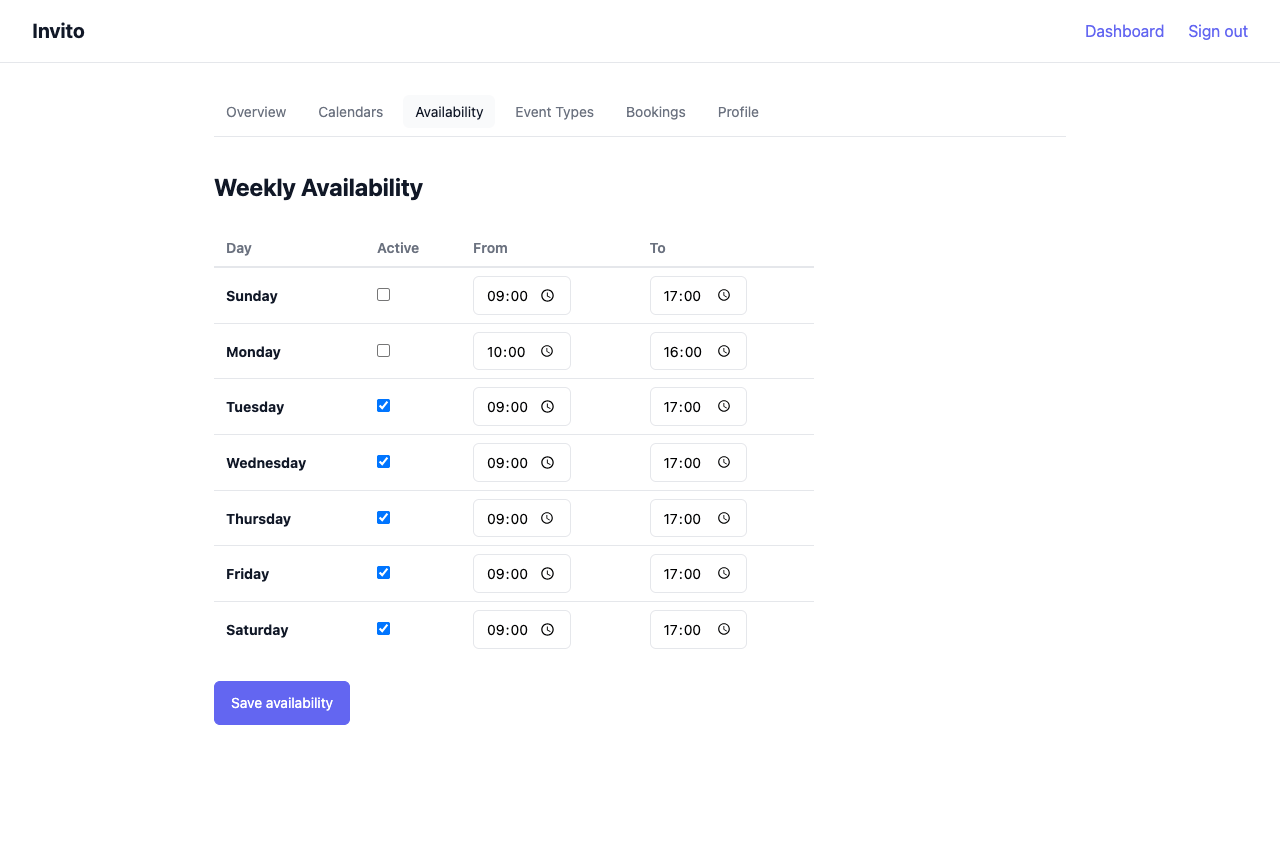
- Go to Dashboard → Availability.
- For each weekday you want to accept bookings, check the checkbox on that row.
- Set the Start time and End time for each active day.
- Click Save.
Your availability takes effect immediately for new slot calculations.
Example
A user available Monday through Friday, 09:00–17:00, with a lunch break:
| Day | Active | Start | End |
|---|---|---|---|
| Monday | ✓ | 09:00 | 12:00 |
| Monday | ✓ | 13:00 | 17:00 |
| Tuesday | ✓ | 09:00 | 12:00 |
| Tuesday | ✓ | 13:00 | 17:00 |
| … | |||
| Saturday | — | ||
| Sunday | — |
To model a lunch break, add two rows for the same weekday: one before lunch and one after.
Notes
- Timezone: Times are interpreted in the timezone you have set in your profile (Dashboard → Profile). Make sure your profile timezone matches your actual location.
- Default: If you save no availability rules, guests will see no available slots on your booking page.
- Calendar conflicts still apply: Availability rules define your theoretical open hours. Slots are further filtered by events already on your synced CalDAV calendars and by existing bookings.
- No exception days: Availability rules repeat every week. One-off blocked days (holidays, vacations) are handled by blocking time on your CalDAV calendar — Invito will read those blocks during sync and hide the overlapping slots.